

Docsort
Case Study
- Docsort is a Document Organizing Software
Who resolve the issue of Document Mess up
Mostly Concerned for Corporate Management
USER
REASEARCH
WIREFRAMING
PROBLEM IDENTITY
VISUAL DESIGN
TESTING
User Research &
Problem Finding
The primary goal of a Document Arranging Dashboard is to streamline document management processes in corporate offices. It aims to enhance productivity by organizing, categorizing, and facilitating easy access to documents, reducing time spent on searching and handling paperwork. The dashboard serves as a centralized platform for document storage, retrieval, and collaboration.


Question we asked during research
Most Important type of Document in Corporate Management?
What are the features that you don’t find in other softwares like G Drive and One drive?
Most Important thing you want in this feature
USER PERSONAS
Michael Nguyen
IT Manager
Demographics

📌 Goals
Ensure secure access to corporate documents.
Implement and manage user roles and
Monitor document access and modifications for compliance.
⭐ Demographics
Education: Master's Degree in Information Technology
Experience: 15 years in IT management
Location: San Francisco, CA
📌 Challanges
Maintaining security and preventing unauthorized access.
Ensuring compliance with data protection regulations.
Managing a robust and scalable document management system
⭐ Key Features Needed
- Strong encryption and security measures.
- Detailed audit trails and access logs.
- Comprehensive user roles and permissions management.
Wireframes


User Flow
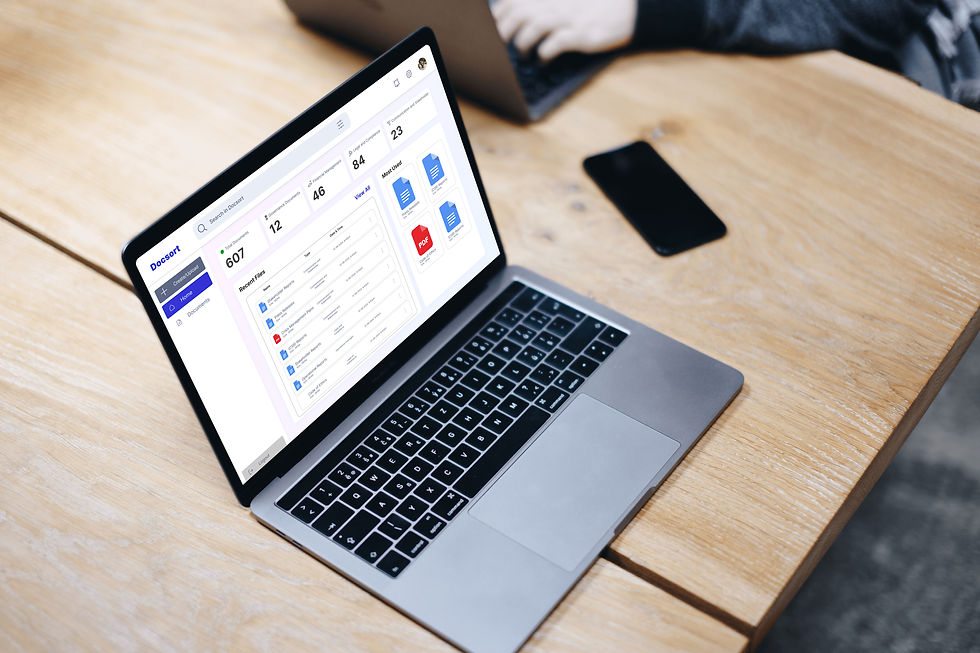
Mockups




Usability Testing Plan
⭐ Define Objectives
⭐ Develop Scenarios and Tasks
⭐ Conduct the Tests
⭐ Report Findings and Make Recommendations
⭐ Identify the Target Audience
⭐ Create a Test Plan
⭐ Collect and Analyze Data
⭐ Iterate and Improve
Goal: Ensure the software is easy to use and meets the needs of corporate users for organizing documents.
Key Questions: Can users easily organize and find documents? Is the interface intuitive? Does it support the necessary corporate management features?
Scenarios: Real-world situations that corporate users would encounter, such as:
Uploading and categorizing documents.
Searching for specific documents.
Sharing documents with team members.
Setting permissions and access controls.
Tasks: Specific actions within these scenarios, like:
Upload a new policy document and categorize it under “HR Policies”.
Find the last month’s financial report.
Share a project document with the marketing team.
Set view-only access for the legal department.
Introduction: Brief participants on the purpose of the test, ensuring they know it’s the software being tested, not their skills.
Tasks Execution: Ask participants to perform the tasks while thinking aloud, describing their thought process.
Observation: Note where they struggle, ask questions for clarification, and observe any confusion or mistakes
Summary: Highlight key findings, common issues, and user feedback.
Recommendations: Suggest improvements based on the findings, such as simplifying navigation, improving search functionality, or enhancing user guides.
Participants: Corporate managers, administrative staff, and employees who handle document organization.
Criteria: Select users with varying levels of technical expertise to get a comprehensive view of usability.
Preparation: Ensure all participants have access to the software and any necessary credentials.
Environment: Conduct tests in a quiet room with a computer setup similar to what participants use at work.
Recording: Use screen recording and note-taking to capture user interactions and feedback.
Qualitative Data: User feedback, comments, and observed difficulties.
Quantitative Data: Time taken to complete tasks, number of errors, and success rates
Implement Changes: Based on the feedback, make necessary adjustments to the software.
Re-test: Conduct further tests to ensure the changes have improved usability.